

Blog

Categories
Uncategorized Blog

In-House IT vs. Managed IT Services: Which Is Right for Your Business in 2026?

Every growing business reaches a moment where the question becomes unavoidable: do we hire someone in-house to handle IT, or do we bring in a managed IT services provider?

It’s not just a budget question – it’s a question about control, culture, risk, and what kind of IT support your business actually needs to run well. Both models have real advantages. Both have real drawbacks. And the right answer depends on who you are as a business.

This guide breaks it down clearly so you can make the decision with confidence.


In-House IT: The Pros and Cons

Hiring a dedicated IT employee means having someone physically present in your office who knows your systems, your team, and your day-to-day operations. For some businesses, that familiarity is invaluable.

In house IT

Advantages

  • Deep familiarity with your specific environment
  • On-site presence for hands-on hardware issues
  • Fully dedicated to your business only
  • Builds internal institutional knowledge over time
  • Easier alignment with company culture
  • Direct control over priorities and workflow


Disadvantages

  • Coverage limited to business hours only
  • One person = one skill set, one perspective
  • Sick days & vacation create real vulnerability
  • Expensive to maintain broad expertise
  • Slower to scale when business grows quickly
  • Recruiting quality IT talent is competitive

The Hidden Challenge: Depth vs. Presence

The biggest limitation of a single in-house hire isn’t commitment – it’s scope. IT today spans cloud infrastructure, cybersecurity, compliance, Microsoft 365, backups, networking, and end-user support. No one person is a deep expert in all of it.

When your in-house IT person reaches the edge of their knowledge – and they will – you’re calling in outside consultants at premium rates, often in the middle of a crisis.

Managed IT Services: The Pros and Cons

A managed IT services provider (MSP) acts as your outsourced IT department. You get a team of specialists, 24/7 monitoring, defined response times, and a single point of accountability – all under one contract.

Managed IT Services

Advantages

  • 24/7 monitoring and support included
  • Full team of specialists across all IT areas
  • Proactive maintenance reduces downtime
  • Scales easily as your business grows
  • Contractual SLAs guarantee response times
  • Cybersecurity built in – not bolted on
  • Virtual CIO for long-term IT planning


Disadvantages

  • Less physical on-site presence day-to-day
  • Requires trust in a third-party partner
  • Onboarding takes time to learn your setup
  • Less visibility without good reporting
  • Quality varies – not all MSPs are equal
  • May feel less “yours” than internal staff

The Core Advantage: Breadth and Resilience

When you work with a managed IT provider, you’re not relying on one person’s knowledge and availability. If your primary contact is on vacation, someone equally qualified picks up. If a threat emerges at 2 AM on a Saturday, the monitoring system catches it and a team responds – not a groggy employee getting woken up by a text message.

For businesses that depend on their technology to operate, that resilience isn’t a luxury. It’s a necessity.


Head-to-Head: How the Two Models Compare

Here’s a quick reference across the factors that matter most to business decision-makers:

head to head comparison2

Which Model Is Right for Your Business?

Neither option is universally better. The right choice depends on your size, complexity, and what you need IT to do for your business.

In-House IT may be the better fit if…

  • Your business has 250+ employees with complex, proprietary internal systems
  • You operate in a highly regulated industry requiring a dedicated on-site compliance resource
  • Your environment demands constant physical hardware management that can’t be handled remotely
  • You already have an IT team and need headcount, not outsourcing


Managed IT Services may be the better fit if…

  • You have under 250 employees and can’t justify – or fully utilize – a full IT department
  • You’ve experienced IT problems after hours and had no one available to respond
  • Cybersecurity and compliance are growing concerns but not currently well-addressed
  • Your IT needs are growing faster than your ability to hire and train
  • You want predictable, reliable IT support without the HR complexity of employment


Don’t Overlook Co-Managed IT

If you already have an internal IT person but need more coverage or specialized expertise, co-managed IT offers a middle path. Your internal team handles the day-to-day; an MSP provides the depth, tools, security layer, and after-hours support they can’t cover alone. It’s a model that’s gaining popularity among businesses that want the best of both worlds.


Questions to Ask Before You Decide

Work through these with your leadership team before committing to either direction:

  • How often do we experience IT issues outside of business hours – and what happens when we do?
  • Does our current IT setup have a cybersecurity strategy, or are we mostly hoping for the best?
  • If our IT person left tomorrow, what would break – and how quickly?
  • Are we growing? Will our IT needs look significantly different in 12–24 months?
  • Do we need IT to be a strategic partner, or just someone who fixes things when they break?

Your honest answers will point you toward the right model more clearly than any general comparison can.


The Bottom Line

In-house IT offers presence and personal familiarity. Managed IT services offer breadth, resilience, and round-the-clock coverage. For most small and mid-sized businesses, the biggest risks – a security breach at 11 PM, an outage during peak hours, a key employee quitting – are exactly the scenarios that managed IT is built to handle and in-house IT struggles with most.

That doesn’t mean managed IT is right for everyone. But if you’re a growing business that depends on technology to operate, it’s worth taking a hard look at what your current setup can and can’t do – and whether there’s a better option available. Get a free consultation to understand if it’s a good fit for your business.

About WorkSmart IT Services

WorkSmart is a leading managed IT services provider serving small and mid-sized businesses across the Southeast. With offices in Charlotte, Raleigh, Durham, Greensboro, Atlanta, and Philadelphia, WorkSmart delivers enterprise-grade IT support, cybersecurity, cloud services, and strategic IT planning to growing businesses.


Frequently Asked Questions

What is the main difference between in-house IT and managed IT services?
In-house IT means employing dedicated staff who work exclusively for your business. Managed IT services means outsourcing to a third-party provider who supports your business using a team of specialists. The key differences are availability, depth of expertise, and cost structure. Providers like WorkSmart IT Services offer fully managed and co-managed models, so businesses can choose the level of support that fits them.

What happens to my IT support if my managed IT provider has an issue?
Reputable MSPs are built with redundancy – your account is never dependent on a single person. If your primary contact is unavailable, another qualified team member steps in. This is one of the key advantages over in-house IT, where one employee calling in sick can leave your business without support. WorkSmart operates as a team-based model, meaning clients always have access to qualified support regardless of individual availability.

Can I use both in-house IT and a managed IT provider at the same time?
Yes. This is called co-managed IT. Your internal staff handle day-to-day tasks while the MSP provides after-hours coverage, specialized expertise, security monitoring, and strategic planning. WorkSmart offers co-managed IT services across its Southeast and Mid-Atlantic markets, making it a practical option for businesses that already have internal IT resources but need more depth and coverage.

How do I know if I’ve outgrown my current IT setup?
Common signs include frequent outages, no coverage outside business hours, a cybersecurity strategy that hasn’t been updated recently, and an IT person who is constantly reactive rather than proactive. WorkSmart offers free IT consultations for businesses in Charlotte, Raleigh, Durham, Greensboro, Atlanta, and Philadelphia – a good starting point if you’re unsure where your gaps are.

What should I look for when choosing a managed IT services provider?
Look for defined SLAs, a team large enough to cover your needs around the clock, proven cybersecurity capabilities, and experience with businesses your size. WorkSmart has been recognized on the Channel Partners MSP 501 list – an annual ranking of the world’s top-performing managed service providers – and holds a finalist position for the 2025 NC TECH Awards in Cybersecurity Innovation. Those kinds of third-party validations are a useful signal when evaluating providers.


Categories
Uncategorized Blog

Strengthening Cybersecurity: Why SMBs Must Act Now

Donald

Donald DeMarco serves as Chief Revenue Officer at WorkSmart, leading the company’s go-to-market strategy, revenue growth initiatives, and client engagement programs. With a sharp focus on aligning cybersecurity services to evolving 2026 threat landscapes, Donald champions WorkSmart’s mission to help SMBs and mid-market organizations proactively protect their data, infrastructure, and business continuity.

Prior to joining WorkSmart, Donald built a distinguished career in technology and managed-services leadership. He brings deep expertise in scaling revenue operations, optimizing service delivery, and bridging technical and executive priorities.

The continuous flow of digital information is inseparable from the operational performance of your organization.
In today’s Digital Age, businesses are more reliant than ever on the uninterrupted functionality of their information systems. This dependency makes the availability and integrity of these systems absolutely vital.
The Evolving Threat Landscape
Historically, extended outages of information systems were often caused by natural disasters, power grid failures, or hardware malfunctions. Today, however, the primary causes have shifted toward cybersecurity breaches and insufficient cyber defenses. As digitization accelerates, cyber threats have become more sophisticated and frequent, targeting organizations of all sizes.
SMBs: A Prime Target
Small and medium-sized businesses (SMBs) are increasingly in the crosshairs of cybercriminals. Nearly half of all cyberattacks are aimed at SMBs. Why? Because SMBs possess valuable data but often lack the robust cybersecurity defenses of larger enterprises, making them more vulnerable to attacks.
Real-World Impact
The rise in cyber incidents among our own customer base has heightened our vigilance. We’ve witnessed firsthand the challenges faced by organizations during ransomware recovery and have supported them with incident response protocols. These experiences reveal a common theme: many businesses’ cyber defenses are not adequate for today’s threat environment. Continuous evaluation and enhancement of security protocols are essential to safeguard against evolving threats.
3930
The Cybersecurity Talent Gap
The demand for skilled cybersecurity professionals far exceeds supply. According to the International Information Systems Security Certification Consortium (ISC2), there are up to 700,000 unfilled cybersecurity roles in the United States and 25,000 in Canada. Globally, millions of positions are expected to remain unfilled in the coming years. This shortage is especially acute for SMBs, most of which lack in-house cybersecurity expertise.
Dispelling Dangerous Myths
A common misconception among SMBs is the belief that “we will not be targeted.” While this sentiment may have held some validity in the past, the landscape has changed dramatically. The emergence of hacking-as-a-service (HaaS) on the dark web means that billions of IP addresses are scanned indiscriminately for vulnerabilities. No business is immune. Even non-profit organizations, which typically lack funds to pay ransoms, have fallen victim to ransomware attacks. This reality underscores the need for a proactive defense strategy.
The Time to Act Is Now
Strengthening your cybersecurity posture is no longer optional—it’s essential. By leveraging comprehensive cybersecurity services, organizations can fortify their defenses and safeguard their data against ransomware and other threats.
You can count on WorkSmart to help you strengthen your cyber defense and protect your data from ransomware. WorkSmart’s consultants can help you determine where your organization sits on the risk spectrum and tailor solutions to your unique needs. No two companies are alike, and effective cybersecurity requires a customized approach that considers compliance, information-based risk, and organizational priorities. To help you take a fresh view of your cyber defense, we have included a Cybersecurity Checklist to help you get started: download it here for free.
And contact us today to discuss your CyberSecurity posture!
Categories
Uncategorized Blog

Windows 10 End of Life: How to Prepare

Windows 10 has been a trusted operating system for over a decade, but its time is almost up. On October 14, 2025, Microsoft will officially retire support for Windows 10. That’s just weeks away – and if you’re still running Windows 10, now is the time to act.

What does “end of support” mean?

When Microsoft ends support for an operating system, here’s what happens:

  • No more security updates – leaving your computer vulnerable to cyberattacks.

  • No bug fixes or patches – issues won’t be corrected, even if they affect your work.

  • No Microsoft support – you won’t be able to rely on Microsoft for help.

  • Compliance concerns – running an unsupported OS could put your business out of step with security standards.

In short: after October 14, Windows 10 devices become a liability.

What are your options?

  1. Upgrade to Windows 11

    • If your hardware is compatible, upgrading is the quickest way to stay secure.

    • Works best for newer machines (typically less than 3 years old).

  2. Replace your PC with a new one

    • The most reliable option if your device is older than 3 years.

    • Ensures better performance and smoother Windows 11 experience.

  3. Extended Security Updates (ESU)

    • Available for organizations that must stay on Windows 10 temporarily (for example, using older applications like QuickBooks 2018).

    • A short-term, more expensive option – not a long-term solution.

Why doing nothing costs more

Unsupported computers are magnets for malware and cyberattacks. For businesses, downtime and security incidents can cost far more than upgrading. And many IT providers (including WorkSmart) will increase support costs for outdated systems because of the extra time and risk involved.

Put simply: doing nothing is the most expensive choice.

Quick checklist: What to do today

  • Check compatibility: Use Microsoft’s PC Health Check tool to see if your device can run Windows 11.

  • Check device age: If it’s over 3 years old, plan to replace it.

  • Back up your data: Ensure your files are safe before upgrading or switching hardware.

  • Talk to your IT provider: Plan bulk upgrades or replacements to minimize downtime.

  • Evaluate extended support only as a bridge: Use it only if you absolutely must stay on Windows 10 temporarily.

Don’t wait until it’s too late

October 14 is right around the corner. Whether you’re an individual user or a business leader managing dozens of computers, making a decision now is the best way to avoid disruption, unnecessary costs, and security risks.

At WorkSmart, we help organizations across the Southeast plan, upgrade, and stay secure with Microsoft technologies. From new hardware to Microsoft 365 services, our team makes the transition seamless. Learn more about our Microsoft support and services. And get a free consultation today!

Categories
Uncategorized Awards/Recognition/Growth Blog

CEO Interview: WorkSmart’s Vision for Lasting Client Success – More Than Just Managed Services

Mike Hamuka Michael Hamuka joins us with an impressive track record of success in transforming businesses and driving sustainable growth. Most recently, as the Chief Revenue Officer at NexusTek, Michael was instrumental in reshaping their go-to-market strategies and leading the integration of multiple acquired companies. His leadership resulted in a stronger, more cohesive organization that thrived in an ever-evolving market.

Prior to NexusTek, Michael held senior roles at IBM, Wipro, and DXC, leading growth initiatives and transformation projects for clients ranging from small and mid-sized businesses to large enterprises. His ability to blend technical expertise with strategic insight has positioned him as a trusted leader in the IT services industry.

“I am honored to join WorkSmart as the CEO,” Michael shared. “The company has a strong foundation built on innovation and delivery excellence. I am excited to work with this talented team to lead the next phase of growth and deliver unparalleled value to our clients.”

Please provide your feedback on how GoodFirms has contributed to increasing your visibility among potential clients.
GoodFirms has provided a valuable platform for us to share our story with a broader audience. It’s helped position WorkSmart not just as a service provider, but as a trusted advisor in the IT space. The ability to highlight our expertise, culture, and client success stories in one place makes it easier for potential clients to connect with what we do and why we do it. It’s also opened the door to conversations we may not have had otherwise.
Please introduce your company and describe your role within the organization.
WorkSmart provides technology-based services to small and medium businesses that view IT as a strategic differentiator. We partner with these organizations to advise, manage, and innovate in ways that reduce risk and support long-term growth. As CEO, I lead the company in delivering on this mission and ensuring we remain a trusted partner for our clients.
What inspired you to join WorkSmart?
In 2001 the ownership team saw a gap in the market—small businesses were beginning to embrace technology but lacked access to quality technical resources without becoming IT experts themselves. WorkSmart was created to offer advisory, engineering, and management services in a predictable model, helping these businesses leverage IT strategically, not as a burden. I’ve long believed this segment is underserved, and joining WorkSmart aligned perfectly with my mission to support small and medium businesses with enterprise-level service. The company’s values and team culture made it an easy decision.
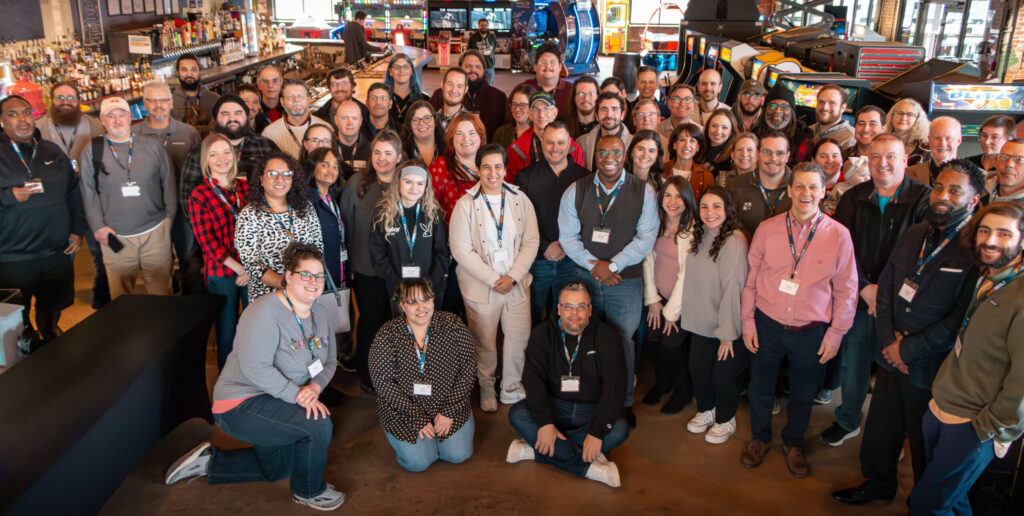
image (11)
What are the core values and principles that drive your company’s culture, and how do you ensure alignment with these values across your team?
Our core values—Do the right thing, Put people first, Own it, and Be curious—are more than just words on a page. They shape how we operate every day and are deeply embedded in our culture. We use them as a lens for hiring, decision-making, and recognizing team members who exemplify these values in their work. It’s how we stay aligned as we grow.
Can you highlight some of the key achievements or milestones your company has accomplished since its inception?
We’ve served clients across North Carolina, South Carolina, and Georgia for over two decades, consistently delivering excellent service and innovative solutions. This commitment has earned us recognition from CRN MSP 501, Best Places to Work, Fast 50 awards, and inclusion in the Inc. 5000 list. We have a long history of being top in our field, top in our geographies, and top in the level of service that we deliver to our clients.
Could you explain your company’s business model?
Our business mantra is pretty straightforward—we meet clients where they are and advise them on opportunities that can improve their business, whether that’s accelerating a desired outcome or solving a complex challenge. We tap into a deep ecosystem of partners, which allows us to not only deliver a world-class experience but also provide best-in-class solutions tailored to each client’s unique needs.
“We don’t see ourselves as a contractor or vendor—we are our clients’ trusted partner, fully invested in helping them achieve their goals.”
How does your company differentiate itself from competitors in the industry?
Our differentiators are the quality of our service and our genuine curiosity about our clients and their success. We aim to understand their business as well as we know our own. We don’t see ourselves as  a contractor or vendor we are our clients trusted partner, fully invested in helping them achieve their goals.
How would you describe the dynamics within your team, and how do you foster collaboration and teamwork to achieve common goals?
We combine the experience of long-tenured employees with the fresh insights of new hires. Our hiring process is centered around our core values, which help ensure a strong cultural and performance fit.
“Our goal is to develop the whole person and support them not just at WorkSmart, but wherever their career may take them.”
What measures do you take to support the professional development and growth of your employees?
We have our own in-house Learning and Development leader—something you don’t often see in companies our size—which gives us a strategic edge. Our programs go beyond technical training to include leadership development, soft skills, and even personal growth. We’ve also launched a mentorship program to connect employees with mentors who can support their individual career goals. Our goal is to develop the whole person and support them not just at WorkSmart, but wherever their career may take them.
Could you share a notable success story or case study that exemplifies the impact your company has had on a client’s business?
One client came to us with a clear need to improve their risk posture, but a limited budget constrained them. Their clients were demanding higher levels of security, and they risked losing key business if they couldn’t meet those expectations. We collaborated with two trusted partners to create a cost-effective solution that meets all their requirements.
Together, we delivered the services within budget and on an acceptable timeline, helping the client retain two critical customers and strengthen their position in the market. It’s a strong example of the value we bring through partnership and creative problem-solving.
What industries do you primarily cater to, and do you have a significant percentage of repeat clients?
We’re a cross-industry provider, but we have particularly strong concentrations in architecture, engineering, construction, and nonprofit organizations. Many of our clients have been with us for over eight years, and some since the company’s inception. Our client retention is consistently high, which we see as a reflection of the long-term value we bring and the trust we build over time.
What initiatives does your company undertake to foster innovation and stay at the forefront of industry trends?
We provide each of our technical team members with dedicated time every month for training and education. Continuous learning is not an afterthought—it’s core to our culture and long-term growth strategy. We operate with a systems integrator mindset, meaning we don’t just sell services—we solve problems. Whether or not a solution generates immediate revenue for us, we prioritize helping our clients stay viable, secure, and positioned for growth. That spirit of innovation is what keeps us ahead.
Please share some of the most sought-after services that clients approach your company for.
Clients typically come to us with three core challenges: improving their risk posture, supporting revenue growth, and enhancing operational and financial performance. To meet those needs, we focus on key areas like end-user experience, resilient and secure cloud environments, and robust business continuity strategies. We don’t just sell services—we engage in meaningful conversations to understand the business problem first, then help clients navigate the best path forward. Our holistic approach ensures we’re delivering real outcomes, not just technical fixes.
How do you build and maintain strong relationships with your clients?
By the nature of our work, we’ve built a model that’s resilient—even during economic downturns, when many businesses cut internal IT roles. In fact, IT services often thrive in those moments. We continuously evaluate how to drive greater accuracy and efficiency, leveraging automation, agentic and generative AI, and streamlined processes. Our mission is simple: to be more effective today than we were yesterday. That mindset, along with a flexible cost structure and commitment to innovation, positions us to adapt and grow through any challenge.
How has your company adapted to changes and challenges in the business landscape?
We’ve built a resilient business model that not only withstands economic fluctuations but often thrives in them. When organizations cut internal IT resources, they turn to trusted partners like us. To stay ahead, we’re constantly refining our processes, exploring automation, and integrating both agentic and generative AI. This ongoing evolution ensures we remain agile, cost-effective, and positioned to deliver even greater value to our clients every day.
“Anyone can offer IT support. What makes us different is our relentless focus on people—our team and our clients.”
What payment structure do you typically follow when billing clients?
Our payment structures are designed to be flexible and client-focused. Most of our services operate on a monthly recurring fee model, which works well for ongoing support and managed services. We also offer fixed-cost, milestone-based, and time-and-materials billing for project or product-based work. Whether it’s a phased implementation or a one-time engagement, we tailor our billing to what makes the most sense for the client. Ultimately, our goal is to keep the experience clear, predictable, and easy to manage.
Do you accept projects that meet your basic budget requirements?
We don’t set a fixed minimum budget. Instead, we evaluate whether we can deliver the desired outcome successfully, on time, and within budget. If a project aligns with our capabilities and we believe we can provide real value—even if it’s a smaller engagement—we’re happy to take it on. It’s about the impact, not the dollar amount.
Can you provide an overview of the price range (minimum and maximum) of the projects your company worked on in 2024?
We work on a wide range of project sizes, with scope and complexity being the primary factors. From small, targeted initiatives to large, enterprise-level engagements, our team is equipped to deliver at every scale. What matters most is alignment with the client’s goals and our ability to drive successful outcomes.
What technological capabilities does your company possess?
We leverage a full spectrum of best-in-class tools for monitoring, automation, and service management. While we regularly evaluate new technologies to ensure we’re delivering maximum value, we’re mindful not to make frequent tool changes that could disrupt operations. Our goal is to stay ahead of the curve without compromising the consistency and reliability our clients depend on.
“Anyone can offer IT support. What makes us different is our relentless focus on people—our team and our clients.”
Where do you envision your company in the next 10 years?
In the next 10 years, we will be the highest-ranked provider of IT advisory and managed services for small and mid-sized businesses in the Southeast. Our continued focus will be on strengthening our expertise in security and business continuity—positioning us as a trusted advisor for compliance and risk mitigation. Just as important, we’re committed to building a workplace that attracts and grows top talent, creating a cycle of innovation and leadership that fuels long-term success.
If you’re a business that’s ready to grow, and you want a partner who understands your challenges and is in it for the long haul — let’s have a conversation. We’d love to hear your goals and explore how we can help you get there.

Categories
Uncategorized Blog

How to Build an IT Roadmap for Small and Medium-Sized Businesses

Is your small or medium-sized business (SMB) navigating the complexities of technology adoption without a clear plan? Without a strategic IT roadmap, you risk misaligned investments and missed opportunities. An IT roadmap serves as a strategic blueprint, aligning your technology initiatives with your business objectives to ensure cohesive growth and innovation.

Understanding the IT Roadmap

An IT roadmap is a strategic document that outlines how your organization will leverage technology to achieve its business goals. It provides a structured approach to planning and implementing technology solutions that support your company’s mission and vision. For SMBs, an IT roadmap is essential to navigate the rapidly evolving technological landscape and maintain a competitive edge.

Benefits of an IT Roadmap for Small Businesses

Implementing an IT roadmap offers several advantages:

  • Alignment of Technology and Business Goals: Ensures that every tech initiative supports your overarching business objectives.
  • Optimized Resource Allocation: Helps in prioritizing investments, ensuring time and budget are spent on high-impact projects.
  • Enhanced Agility: Prepares your business to adapt swiftly to market changes with a proactive technology strategy.
  • Risk Mitigation: Identifies potential technological risks and outlines strategies to address them before they impact operations.

How To Build An Effective IT Roadmap

Step 1: Assess Your Current IT Infrastructure

Before you can plan for the future, you need to understand where your business stands today. Conduct an IT audit to evaluate your existing hardware, software, network, and security systems. 

Identify outdated technology, potential security risks, and inefficiencies that may be slowing down operations. Engage with employees to get feedback on their tech pain points and challenges—this can help you pinpoint areas for improvement.

Step 2: Define Business Goals and IT Needs

Your IT roadmap should be closely aligned with your company’s short-term and long-term objectives. Ask yourself:

  • Are you planning to scale operations?
  • Do you need better collaboration tools for remote teams?
  • Are you struggling with cybersecurity risks?
  • Do you want to migrate to cloud-based solutions for better flexibility?


By identifying your business priorities, you can determine which IT solutions are essential for achieving them.

Step 3: Prioritize IT Projects

Not all technology upgrades need to happen at once. Prioritize initiatives based on urgency, budget, and business impact. For example, cybersecurity enhancements should always be a top priority, while upgrading office computers may be a lower-tier investment if they’re still functional. 

A phased approach allows your business to implement changes efficiently without overburdening your team or finances.

Step 4: Budget and Allocate Resources

IT investments require careful budgeting. Factor in costs for new hardware, software licenses, cloud subscriptions, IT support, and training for employees. 

Managed IT services can help small businesses control costs while gaining access to expert support and enterprise-level technology. By setting a clear budget, you can avoid unexpected expenses and ensure that your IT initiatives are financially sustainable.

Step 5: Implement and Monitor Progress

Once you’ve outlined your IT initiatives, create a timeline for implementation. Assign responsibilities to key team members or partner with a managed IT services provider to oversee critical projects. Regularly review your IT roadmap, track progress, and adjust as needed based on evolving business needs, technology advancements, or cybersecurity threats.

An IT roadmap is not a one-time document—it’s a living strategy that should evolve alongside your business. By taking a proactive approach to IT planning, small businesses can minimize risks, improve productivity, and stay ahead in an increasingly digital world.

How WorkSmart Can Assist You

As you can see, there’s a lot that goes into building an effective IT roadmap–but you don’t have to do it alone. At WorkSmart, we specialize in helping SMBs develop and implement effective IT roadmaps. Our team provides comprehensive technology support, strategic guidance, and managed IT services tailored to your unique business needs. 

By partnering with us, you can ensure that your technology investments are aligned with your business objectives, positioning your company for sustained growth and success. Contact one of our Senior Business Advisors today for a one-on-one consultation to help with your business technology needs.

Categories
Uncategorized

Thank you!

Your Vote Has Been Counted!

Thank you for participating! Each vote helps us better understand diverse perspectives and preferences. We appreciate your involvement in shaping our future efforts.

Categories
Uncategorized

5 Key Benefits of Outsourcing IT Support for Your Growing Business

Launching a business involves completing a multitude of administrative tasks just to get your company off the ground. But now that your business has begun experiencing steady growth, you may start thinking about tasks that help your company grow and can benefit your long-term stability and success — like hiring IT support. 

Many business owners believe that the only way to gain focused technology assistance is by staffing an in-house IT department. But in reality, outsourcing IT support to a managed service provider delivers all of the same benefits as hiring an in-house staff without the unnecessary costs. It may be the solution your business needs to gain reliable IT services while you continue growing your venture. 

1. Focus on Your Business 

Until now, you have likely attempted to handle IT issues on your own. You don’t have an in-house staff to consult, and “IT person” is just one of the many hats you’ve worn throughout your business’s development. 

However, outsourcing IT support allows you to focus all of your attention on your critical business processes and avoid wasting any time or energy on technology mishaps. You also won’t need to steal employees away from their tasks to assist with IT issues. Instead, you can pass the process over to an entirely external team while your employees keep the focus on your business goals. 

2. Save Money Compared to In-House IT Support

Hiring even one part-time IT professional to join your team proves costly. A recent survey showed that an IT hire that can run an entire internal environment currently costs around $100k per year. Any software, tools, and equipment they need will come straight out of your revenue. And if you want them to be on call when you need them, you’ll pay a lot more in their wages than the value you receive from their services. 

Of course, most companies don’t have only one part-time IT person — they need entire teams of IT professionals who are available during full-time hours. This level of support becomes even more expensive.

Instead, outsourcing services to a managed IT provider gives you the same access to qualified professionals without needing to add them to the payroll. 

3. Customize Your Level of Assistance 

Your growing business may not need full-time or even part-time IT support every week. Some weeks, you may only have a quick question that requires 30 minutes of assistance from an IT professional. Other weeks, you may need in-depth assistance rolling out new software across your entire company. 

One of the main benefits of outsourced IT support is that you don’t need to overpay for a one-size-fits-all plan that your company rarely uses — or drown under a mountain of IT problems when you’ve only paid for part-time support. You can customize the level of customer service you receive from your managed service provider based on your business’s precise needs. 

Managed services are also scalable. While you may purchase a lower service tier now, once your business expands in a year or two, you can easily switch to a higher tier without needing to search for a new provider. 

4. Gain Specialist-Level Support

Working with a managed service provider gives you access to an entire team of expert information technology professionals with a wealth of knowledge and experience in the field. To gain this same level of expertise in an in-house employee, you’d need to spend well over $100,000 per year on their annual salary alone. 

Managed service providers employ IT and customer support professionals who understand your company’s systems and software intimately. They have years of experience managing these programs and can quickly resolve issues to prevent downtime. You gain this expertise whenever you need it without needing to keep in-house staff on the payroll. 

5. Reduce Cybersecurity Threats

Even if your business doesn’t frequently need IT support, having a managed service provider on call can improve your response time to cybersecurity threats that plague virtually every business in this digital age. At the first sign of a potential data breach or other cyber threat, you can contact your managed IT support for fast assistance.

You can also enlist your managed service provider to monitor your systems and watch for potential threats, then thwart them before they turn into expensive issues. 

Work Smarter and Outsource IT Support to WorkSmart

Outsourcing IT support to a managed service provider gives you personalized IT assistance whenever you need it for a low price tag. At WorkSmart, we specialize in providing managed IT services for businesses like yours. 

Request a free consultation today by calling (888) 484-1012 to learn more about how we can assist with your IT and cybersecurity needs

Categories
Uncategorized

Thank you!

We’ve received your request!

Our Account Support team will reach out shortly regarding your quote.

Categories
Uncategorized Data Backups & Recovery Cybersecurity - Prevention Blog

How to Handle End-of-Life IT Equipment

“Your hardware has reached the end of its useful life.” As a business leader, you’ve likely seen this message before, but do you know what it actually means? Or how it can affect your business operations?

Categories
Uncategorized

Learn a little more about the people you’re going to love!

Jason, Service Manager
As a Service Manager, Jason owns the support experience for our clients. He manages the technicians that work on your support tickets as well as the onsite consultant team. It’s his job to ensure that we are communicating effectively and resolving issues quickly.

After more than 19 years at WorkSmart, Jason has experience in a little bit of everything. He’s extremely knowledgeable in the IT industry and will work to solve any problem thrown at him.

In his spare time, Jason enjoys scuba diving in many different locations and hanging out with his dogs!

What folks say about Jason:

“I want to thank you from the bottom of my heart for working the firewall issue. It’s people like you that make me happy that I work at WorkSmart!”

“Our meeting this week moved the process documentation project for Service forward leaps and bounds. Thank you for collaborating with me and breaking down what we need to adapt from current processes.”

kleiman jason
Sam, Technical Support Engineer
Sam, Technical Support Engineer With a life-long passion for all things technology and sports, Sam began his career in the sports broadcasting world. He spent six years broadcasting everything from West Text high school football all the way up to Division II college football before beginning his career in the IT industry.

He now resides in NC with his fiancé and their Jack Russell Terrier named Maple. When he isn’t working, he’s usually out trying to find places to explore outdoors. Whether it’s a simple hike or climbing to the top of the tallest rocky outcrop, he enjoys being out in nature.

What our clients say about SAM:

“Thanks a million! Sam is my hero! He dives right in and diagnoses the problems quickly.”

“Sam has done a fantastic job helping with any problems we’ve had. Timely and professional – it’s greatly appreciated.

Dre, Technical Support Engineer
Originally from Mount Vernon, New York, Dre moved to Georgia in 2005 for high school and later attended Georgia Gwinnett College where he majored in Information Technology – Systems and Security.

Dre loves learning about new advancements in technology and applying them to his both his work and personal life.

In his spare time, he enjoys gaming on his PC, powerlifting, swimming, and spending time with his dog Bailee.

What our clients say about DRE:

“Andre is consistently always helpful. He has great knowledge and lots of patience. He is a great asset to WorkSmart’s Team!”

“It is a pleasure to work with Andre. His calm demeanor makes it super easy to work through issues.

Dre, Technical Support Engineer
Randy, Consultant
Randy, Consultant Randy currently resides in Georgia with his wife, Carla and their new puppy Dakota. In his spare time, Randy enjoys pretty much anything outdoors including, hiking, camping, and taking long walks with his dog.

He enjoys reading the Sunday paper and his car magazines, as well as listening to Rock and Alternative music.

Randy has a knack for trouble shooting problems and making our clients feel at ease. He strongly believes in making the world a better place one computer at a time.

What our clients say about randy:

“On time. Great attitude. Friendly. Spent a few minutes helping a co-worker with an issue. Randy was the best!”

“Randy is ALWAYS able to find a solution to my technical issues and is very kind and professional!”

Andrew, Consultant
Originally from Jackson, Mississippi, Andrew relocated to Atlanta in 2016 where he now resides with his wife and three kids.

In his free time, Andrew enjoys spending time with his family, playing video games, and hanging out with his dog (April) and cat (Kitty).

What our clients say about ANDREW:

“Andrew does a fantastic job, very knowledgeable!

“Three (3) Laptops Setup – BOOM! No time at all. Thanks Andrew!!!!”

“Thank you for your quick response on our emergency email situation!”

Andrew, Consultant
Nick, Technical Support Representative
Nick, Technical Support Representative Nick currently resides in the Atlanta, Georgia area with his wife and two little girls. In his free time, he loves cheering on his Georgia Bulldogs. 

Nick also enjoys disc golf, playing video games, hanging out with his dog Bullet, and tinkering with his own computer set up at home.

What our clients say about NICK:

“Nick was upbeat and helpful.”

“Nick did great! I was expecting to have to purchase a new docking station and he was able to get it to work after about 25 minutes. I am so appreciative!

“Nick stuck with the problem until it was fixed — I truly appreciated it!”

Chloe, Technical Support Representative
Chloe currently resides in Georgia and has a passion for all things technology, with a wide range of experience in a few different areas. In her free time, she likes to play video games, draw, and play table top RPGs such as DnD. 

She also is very skilled at programming and occasionally makes small games, one of which ended up winning the Georgia Game Developer Association’s Best in Georgia for 2022.

What our clients say about CHLOE:

“Chloe was helpful, flexible and communicated with me through the process.

“Thank you for a quick response to my ticket. Chole was great and it was a simple fix.”

“Chloe is great and such a delight to work with.”

Chloe, Technical Support Representative
Ashan, Technical Support Engineer
Ashan, Technical Support Engineer Raised in Brooklyn, Ashan has now become fully embraced in Atlanta and is very proud of his Trinidadian culture.

He grew up playing basketball, riding bmx, playing video games & doing karate.

In his free time, Ashan enjoys all things tech, anime & video games.

What our clients say about ASHAN:

“Very fast response! Excellent service.”