Blog

Categories
Blog Data Backups & Recovery

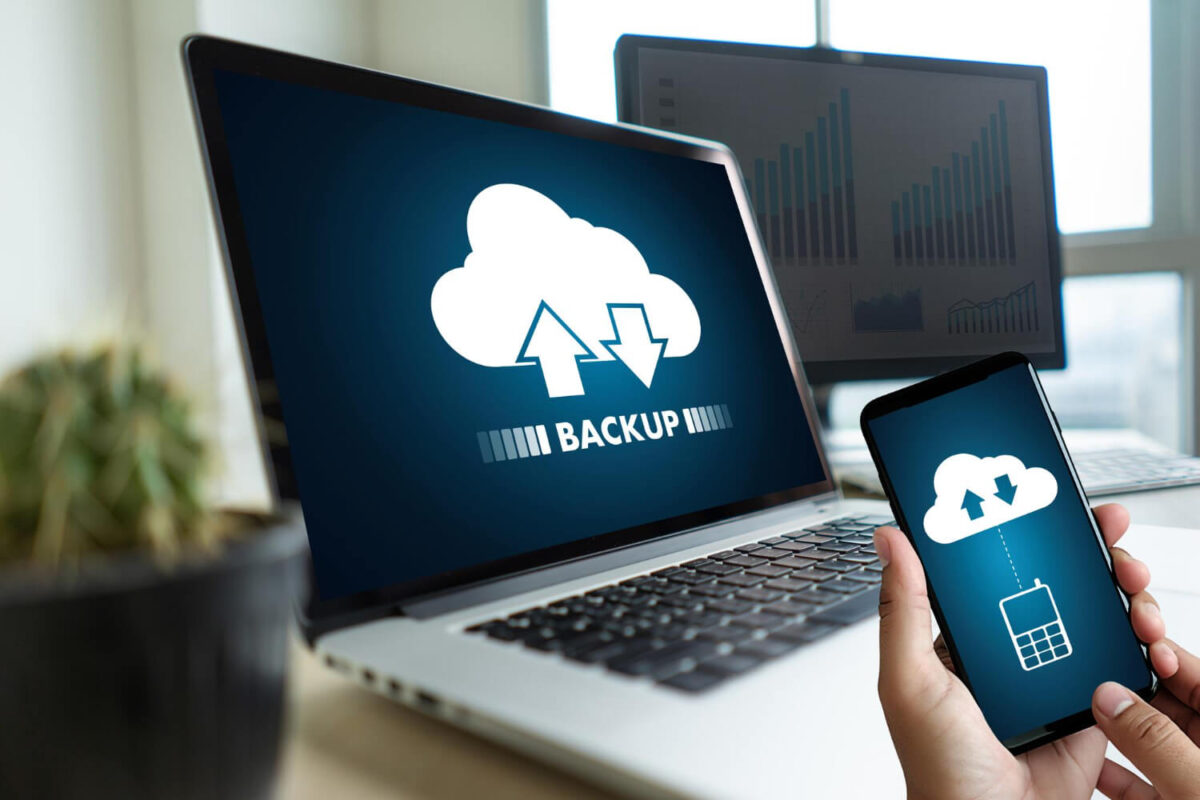
World Backup Day 2025: Why Backups Matter More Than Ever for Small Businesses

Every year on March 31st, World Backup Day serves as a timely reminder: your business is only as secure as your data protection strategy.

For many organizations, especially small and medium-sized businesses, data backup and recovery tends to fall into the “we’ll deal with it later” category – until something goes wrong. And by then, it’s often too late.

In a digital-first world, where ransomware attacks, hardware failures, accidental deletions, and natural disasters are all real threats, reliable backups are not optional—they’re essential.


Why Backups Matter More Than Ever

Today’s businesses rely heavily on data to operate, serve customers, and make strategic decisions. A single data loss event – whether from a cyberattack or human error – can bring operations to a halt, damage your reputation, and result in significant financial loss.

Unfortunately, too many companies believe they’re protected, when in reality they either:

  • Aren’t backing up everything they should

  • Don’t test whether their backups actually work

  • Rely solely on cloud platforms, assuming those count as full backups

This gap between perception and reality is one of the biggest risks in IT today.

Common Misconceptions That Put Businesses at Risk

It’s important to address some of the common myths about backups that create a false sense of security:

“We’re using the cloud—so we’re safe.”
Cloud services like Microsoft 365 and Google Workspace offer great redundancy, but they’re not backup solutions. They often lack protection against accidental deletion, ransomware, or insider threats.

“We already have backups.”
That may be true – but when was the last time you tested them? Many businesses don’t realize their backup failed until they try to recover something.

“We don’t need to back up everything.”
It’s tempting to cut corners, but even “less important” files can contain operational knowledge or compliance-critical data. The cost of not having access can be far greater than the cost of backing it up.

Backup vs. Business Continuity: There’s a Difference

A backup is just a copy of your data. Business continuity, on the other hand, ensures your business can keep running during and after an incident.

It’s not just about storing data – it’s about:

  • How quickly you can recover from an incident

  • How much downtime you can tolerate

  • How well your systems integrate with your business operations

This is where many off-the-shelf backup tools fall short. They may store your data, but they don’t help you plan for recovery speed, downtime cost, or strategic risk mitigation.

How WorkSmart Helps Businesses Build Smart Backup Strategies

At WorkSmart, we view data protection as a business conversation, not just a technical checkbox.

Our approach is designed for businesses that want more than “set it and forget it.” We help clients:

  • Identify which systems and data are most critical

  • Design a right-fit backup and disaster recovery plan

  • Regularly test and validate backups

  • Align their data protection strategy with business goals and compliance needs

From automated backups and offsite storage to ransomware protection and recovery testing, our team works proactively so our clients are always prepared—no matter what comes their way.

Ready to Strengthen Your Backup Strategy?

At WorkSmart, we help businesses build data protection plans that are resilient, tested, and ready to support your growth.
Contact us for a free IT health check or let’s schedule a quick conversation to review your current setup.


Categories
Blog

The Importance of Regular IT Strategy Meetings: Leveraging Tools for Future Planning

Technology evolves rapidly, and if your business isn’t keeping up, you could be falling behind your competitors. With each of our ManagedShield plans, we include regular IT Strategy Meetings (ITSMs). 

IT strategy meetings help businesses align their technology investments with long-term goals, ensuring resources are used efficiently and securely. Without a clear strategy, small to mid-sized businesses risk inefficiencies, security vulnerabilities, and missed opportunities for growth.

Regular IT strategy meetings keep your business agile, addressing immediate needs while preparing for future advancements. By leveraging the right tools and strategic planning, you can maximize efficiency, reduce risks, and create a roadmap for sustainable success.

Why IT Strategy Meetings Matter

Aligning Technology with Business Goals

Your business objectives drive technology decisions, not the other way around. IT strategy meetings help ensure that your technology supports your business needs—whether that’s enhancing security, improving workflow automation, or scaling your IT infrastructure.

Proactively Managing Risks

Cybersecurity threats, data loss, and compliance issues can derail business operations. Regular IT planning helps identify potential risks before they become critical, allowing for proactive solutions that protect your data and operations.

Optimizing IT Budgets

Wasted IT spending often results from a lack of strategic planning. IT strategy meetings allow businesses to assess current investments, eliminate redundant tools, and allocate resources toward technology that delivers real value.

Key Elements of Effective IT Strategy Meetings

We know your time is important – at WorkSmart, we want to make sure each and every IT Strategy Meeting is actionable for you and your business and gives you the information and insight you need to keep your technology as a strategic advantage.

In each meeting, we generally follow this process:

1. Define Clear Objectives

Each meeting will have a focused agenda. Whether it’s evaluating existing IT infrastructure, planning for an upgrade, or discussing security policies, defining goals ensures that time is well spent.

2. Review Performance Metrics

Tracking system performance, response times, and downtime metrics provides valuable insights into IT effectiveness. Reviewing these metrics helps businesses identify gaps and prioritize improvements.

3. Address Cybersecurity Concerns

Security threats are constantly evolving. IT strategy meetings should include discussions on data protection, employee training, compliance updates, and emerging threats to keep your business secure.

4. Assess Emerging Technologies

Technology advances quickly. Regular discussions around cloud solutions, automation, and AI-powered tools help businesses stay competitive and identify opportunities for innovation.

5. Plan for IT Scalability

As businesses grow, their IT infrastructure must adapt. Strategy meetings help forecast future needs, ensuring that systems and support services scale efficiently with business expansion.

Make IT Strategy a Priority With WorkSmart

Your business success depends on how well you align technology with strategic goals. IT strategy meetings provide a structured approach to managing IT resources, mitigating risks, and planning for the future.

Want to improve your IT strategy? Learn more about IT strategy and planning and see how WorkSmart can help drive your business forward. Or schedule a free consultation today.


Categories
Blog Microsoft 365

How Microsoft Teams Transforms Communication and Collaboration in the Workplace

Imagine a workspace where every tool you need is seamlessly integrated, allowing for effortless collaboration and communication. Microsoft Teams offers such a platform, revolutionizing how organizations operate by bringing together chat, video meetings, file storage, and app integration into a single, unified hub.

Unified Communication Platform

Microsoft Teams serves as a comprehensive communication solution that allows team members and external users to have real-time conversations through instant messaging. It also enables organizations to host high-quality audio and video calls, connecting participants from across the globe and enhancing remote collaboration. 

Teams also helps streamline meeting management by allowing users to schedule and join meetings directly within the platform, ensuring efficiency and that all participants remain in the loop.

Seamless Collaboration Tools

Beyond communication, Teams enhances collaboration through:

  • File Sharing and Co-Authoring: Share documents within channels and collaborate in real-time, with changes instantly visible to all team members.
  • Integration with Microsoft 365: Access and edit Word, Excel, and PowerPoint files directly within Teams, eliminating the need to switch between applications.
  • Third-Party App Integration: Incorporate tools like Trello, Asana, and GitHub to tailor the workspace to your team’s specific needs.

Enhancing Productivity with Advanced Features

Microsoft Teams keeps adding new tools to help people work better together. One useful feature is the Meeting Recap, which automatically creates a summary of meetings, including written records and important points discussed. This makes it easy for anyone who missed a meeting—or needs a quick reminder—to see what happened without watching long videos or taking detailed notes.

Another helpful feature is Customizable Notifications. This lets users choose what updates they want to get. By controlling these alerts, workers can focus better on important tasks without getting distracted by constant messages.

Teams also lets people use Collaborative Annotations during meetings. This means team members can draw or make notes directly on the shared screen while someone is presenting. This helps everyone stay involved, understand clearly, and share ideas more easily.

Security and Compliance

Microsoft Teams takes security very seriously to protect users and their information. It includes features that help keep private data safe and secure. Teams uses built-in security tools to guard against cyber threats and make sure important information doesn’t fall into the wrong hands.

Admins in Teams have special controls that let them decide who can see information or join meetings. They can manage permissions, set up rules, and limit who has access to different parts of the platform. This helps companies make sure that only the right people can get to sensitive information.

Another important security feature in Microsoft Teams is compliance. Compliance means following rules set by industries or governments to keep information safe and private. Teams is designed to meet these rules, so businesses can trust that their data stays protected and that they won’t break any important regulations.

WorkSmart: Your Partner in Leveraging Microsoft Teams

At WorkSmart, we specialize in helping small and midsized businesses harness the full potential of Microsoft Teams. Our services include:

  • Customized Implementation: Tailoring Teams to fit your organization’s unique workflows and processes.
  • Training and Support: Providing comprehensive training sessions to ensure your team is proficient in using all features Teams offers.
  • Ongoing Consultation: Offering strategic guidance to adapt and evolve your Teams environment as your business grows.


Embrace the future of workplace collaboration with Microsoft Teams, and let WorkSmart guide you every step of the way.


Categories
Uncategorized Blog

How to Build an IT Roadmap for Small and Medium-Sized Businesses

Is your small or medium-sized business (SMB) navigating the complexities of technology adoption without a clear plan? Without a strategic IT roadmap, you risk misaligned investments and missed opportunities. An IT roadmap serves as a strategic blueprint, aligning your technology initiatives with your business objectives to ensure cohesive growth and innovation.

Understanding the IT Roadmap

An IT roadmap is a strategic document that outlines how your organization will leverage technology to achieve its business goals. It provides a structured approach to planning and implementing technology solutions that support your company’s mission and vision. For SMBs, an IT roadmap is essential to navigate the rapidly evolving technological landscape and maintain a competitive edge.

Benefits of an IT Roadmap for Small Businesses

Implementing an IT roadmap offers several advantages:

  • Alignment of Technology and Business Goals: Ensures that every tech initiative supports your overarching business objectives.
  • Optimized Resource Allocation: Helps in prioritizing investments, ensuring time and budget are spent on high-impact projects.
  • Enhanced Agility: Prepares your business to adapt swiftly to market changes with a proactive technology strategy.
  • Risk Mitigation: Identifies potential technological risks and outlines strategies to address them before they impact operations.

How To Build An Effective IT Roadmap

Step 1: Assess Your Current IT Infrastructure

Before you can plan for the future, you need to understand where your business stands today. Conduct an IT audit to evaluate your existing hardware, software, network, and security systems. 

Identify outdated technology, potential security risks, and inefficiencies that may be slowing down operations. Engage with employees to get feedback on their tech pain points and challenges—this can help you pinpoint areas for improvement.

Step 2: Define Business Goals and IT Needs

Your IT roadmap should be closely aligned with your company’s short-term and long-term objectives. Ask yourself:

  • Are you planning to scale operations?
  • Do you need better collaboration tools for remote teams?
  • Are you struggling with cybersecurity risks?
  • Do you want to migrate to cloud-based solutions for better flexibility?


By identifying your business priorities, you can determine which IT solutions are essential for achieving them.

Step 3: Prioritize IT Projects

Not all technology upgrades need to happen at once. Prioritize initiatives based on urgency, budget, and business impact. For example, cybersecurity enhancements should always be a top priority, while upgrading office computers may be a lower-tier investment if they’re still functional. 

A phased approach allows your business to implement changes efficiently without overburdening your team or finances.

Step 4: Budget and Allocate Resources

IT investments require careful budgeting. Factor in costs for new hardware, software licenses, cloud subscriptions, IT support, and training for employees. 

Managed IT services can help small businesses control costs while gaining access to expert support and enterprise-level technology. By setting a clear budget, you can avoid unexpected expenses and ensure that your IT initiatives are financially sustainable.

Step 5: Implement and Monitor Progress

Once you’ve outlined your IT initiatives, create a timeline for implementation. Assign responsibilities to key team members or partner with a managed IT services provider to oversee critical projects. Regularly review your IT roadmap, track progress, and adjust as needed based on evolving business needs, technology advancements, or cybersecurity threats.

An IT roadmap is not a one-time document—it’s a living strategy that should evolve alongside your business. By taking a proactive approach to IT planning, small businesses can minimize risks, improve productivity, and stay ahead in an increasingly digital world.

How WorkSmart Can Assist You

As you can see, there’s a lot that goes into building an effective IT roadmap–but you don’t have to do it alone. At WorkSmart, we specialize in helping SMBs develop and implement effective IT roadmaps. Our team provides comprehensive technology support, strategic guidance, and managed IT services tailored to your unique business needs. 

By partnering with us, you can ensure that your technology investments are aligned with your business objectives, positioning your company for sustained growth and success. Contact one of our Senior Business Advisors today for a one-on-one consultation to help with your business technology needs.

Categories
Blog

WorkSmart Achieves Sophos Platinum Partner Status

sophos global partner program platinum

We are thrilled to announce that WorkSmart has been awarded the prestigious
Platinum Partner status by Sophos, a global leader in cybersecurity solutions.
This recognition places WorkSmart among an elite group of IT service providers with the highest
level of expertise and commitment to delivering advanced cybersecurity services.

Achieving Platinum Partner status signifies our dedication to providing top-tier security solutions and our proficiency in implementing Sophos’s comprehensive suite of products. This partnership enhances our ability to protect our clients against evolving cyber threats, including malware, ransomware, phishing attacks, and data breaches.

As a Sophos Platinum Partner, WorkSmart gains access to exclusive benefits, including:

  • Advanced Training and Certification: Ensuring our team remains at the forefront of cybersecurity developments.
  • Priority Support: Providing our clients with expedited issue resolution and dedicated assistance.
  • Collaborative Engagements: Working closely with Sophos on joint initiatives to deliver cutting-edge security solutions.

This milestone reflects our unwavering commitment to safeguarding our clients’ digital assets and reinforces our position as a trusted cybersecurity partner.

For more information about our cybersecurity services and how we can help protect your organization, please contact us.

Categories
Blog

Top 5 Phishing Attacks in 2025 and How to Protect Yourself

Phishing attacks are evolving rapidly, becoming more sophisticated and harder to detect. In 2025, cybercriminals are using AI-driven scams, deepfake technology, and advanced social engineering tactics to trick individuals and businesses into revealing sensitive information. Over 3.4 billion phishing emails are sent daily—many using AI.

With phishing responsible for over 90% of data breaches, understanding the latest threats and knowing how to protect yourself is crucial. Below are the top five phishing attacks in 2025 and what you can do to stay safe.

1. AI-Generated Phishing Emails

Attackers are now using AI-powered tools to create highly personalized phishing emails that mimic the writing style of real people. These emails often appear to come from a trusted colleague, your bank, or a known vendor, making them harder to spot. AI-generated phishing messages have fewer grammar mistakes, making them much more convincing than traditional scams.

How to protect your business:

  • Always verify unexpected emails by calling the sender directly.
  • Look for slight variations in email addresses or domain names.
  • Use email security filters that detect AI-generated phishing attempts.

Deepfake Voice & Video Phishing (Vishing)

Deepfake technology is being used to clone voices and even generate fake video messages to deceive people into transferring money or sharing confidential data. Attackers can now call employees and sound exactly like their boss, instructing them to approve wire transfers or reset passwords.

How to protect your business:

  • Always confirm financial or sensitive requests through a second communication channel.
  • Train employees to recognize and question suspicious or urgent requests.
  • Implement multi-factor authentication for financial transactions.

3. QR Code Phishing (Quishing)

QR code phishing, or “quishing,” has become a major threat in 2025. Hackers are placing malicious QR codes on emails, signs, or even fake customer service messages, tricking users into scanning them. Once scanned, they direct victims to fraudulent websites that steal login credentials or install malware.

How to protect your business:

  • Never scan QR codes from untrusted sources.
  • Use a QR code scanner that shows the full URL before opening the link.
  • Be cautious of urgent messages asking you to scan a QR code for verification.

4. SaaS & Cloud Account Takeover Phishing

With more businesses relying on cloud-based applications, attackers are targeting Microsoft 365, Google Workspace, and other SaaS platforms with fake login pages. Victims receive emails that appear to be from IT support, asking them to log in to “resolve an issue.” Once they enter their credentials, hackers gain full access to their business accounts.

How to protect your business:

  • Always check the URL of any login page before entering credentials.
  • Enable multi-factor authentication (MFA) for all cloud accounts.
  • Train employees to recognize fake login attempts.

5. Supply Chain Phishing Attacks

Hackers are now targeting vendors and suppliers to compromise their communication channels. Instead of attacking companies directly, they infiltrate third-party systems and send fraudulent invoices, contract updates, or payment requests that appear to come from a trusted partner.

How to protect your business:

  • Verify any changes to payment details directly with the vendor.
  • Implement email authentication protocols like SPF, DKIM, and DMARC.
  • Use zero-trust security principles to minimize access to sensitive data.

Final Thoughts: Stay One Step Ahead of Phishing Attacks

Phishing attacks in 2025 are more advanced than ever, using AI, deepfake technology, and social engineering to deceive victims. Being aware of these threats and implementing strong security measures is key to protecting yourself and your business.

If you want to strengthen your cybersecurity posture, WorkSmart can help. We provide advanced phishing protection, employee training, and security solutions to keep your business safe.

Get in touch today and make sure your organization is phishing-proof.

Categories
Blog

Why You Should Upgrade to the New Outlook for Windows

Microsoft has reimagined Outlook for Windows, bringing a fresh, modern experience designed to help you work smarter, not harder. With an updated interface, faster performance, and deep Microsoft 365 integration, the new Outlook is built to simplify email management, boost productivity, and enhance security.

If you’re still using the traditional Outlook, it’s time to explore what’s new. Let’s dive into how the latest version can help streamline your workflow and why it might be the upgrade you need.

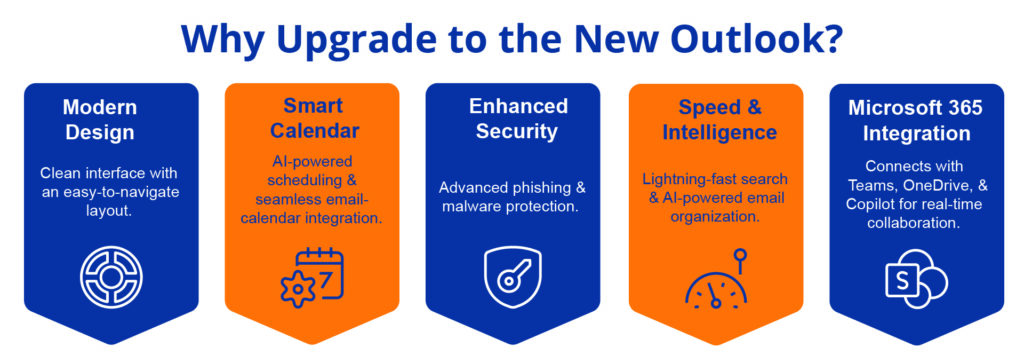
Worksmart. Why Upgrade to the New Outlook?

What’s New in Outlook for Windows?

The new Outlook is more than just a redesign—it’s a smarter way to manage your emails, calendar, and tasks. Here’s what makes it stand out:

A Modern, Intuitive Interface

  • Say goodbye to clutter! The new Outlook offers a cleaner, more organized look that makes navigation effortless.
  • Focus on what matters with a simplified ribbon that keeps essential tools at your fingertips.

Faster & More Efficient

  • Lightning-fast search helps you find emails in seconds.
  • Enjoy real-time syncing across devices, so your inbox is always up to date.

Smarter Calendar & Scheduling

  • Use AI-powered scheduling to find the best meeting times.
  • Quickly switch between email and calendar with a seamless, built-in integration.

Deep Microsoft 365 Integration

  • Attach OneDrive files directly and edit them without leaving Outlook.
  • Get real-time collaboration with Microsoft Teams and Copilot.

Enhanced Security & AI Features

  • Advanced phishing and malware protection keep your inbox safe.
  • AI-powered email sorting helps prioritize important messages.

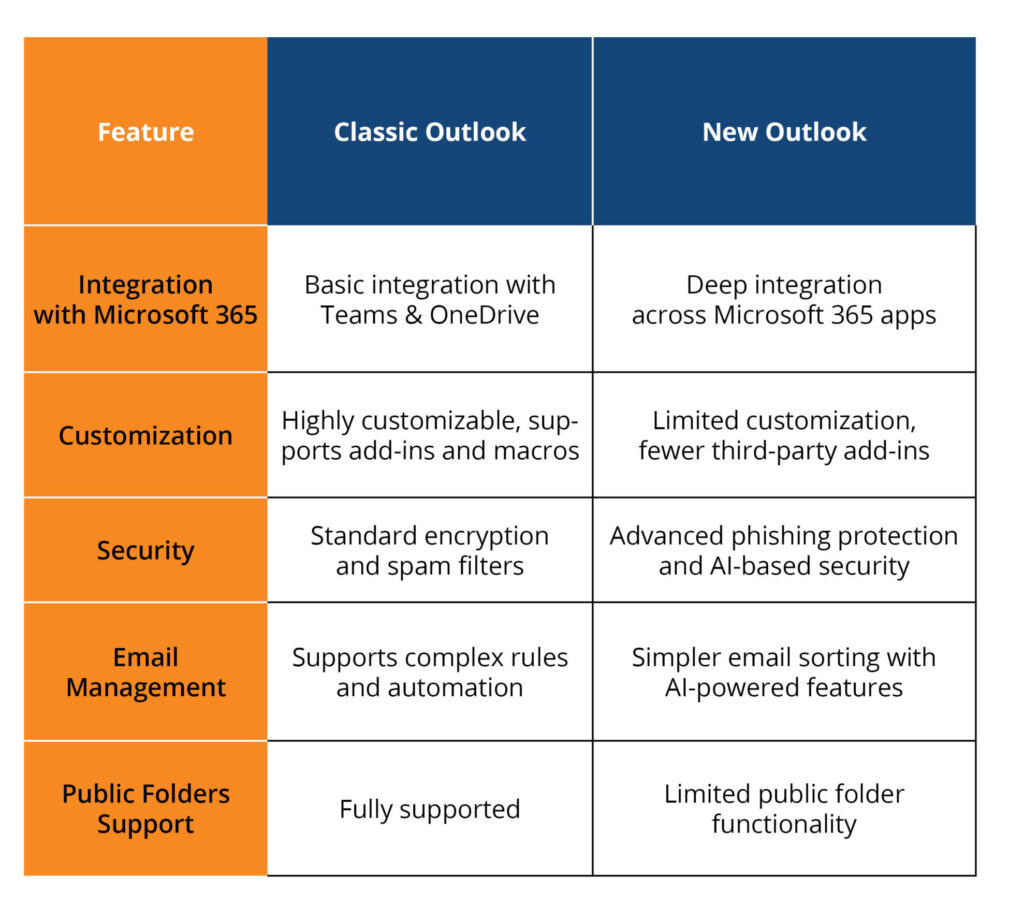
Outlook

Why Make the Switch?

Microsoft introduced the new Outlook for Windows in May 2022 as a preview, and by September 2023, it became generally available for personal accounts. The transition to this modern experience will continue over the next few years, with Microsoft planning to support the classic Outlook until at least 2029. However, starting January 2025, some business users on the Current Channel will automatically be switched to the new Outlook, though they’ll still have the option to revert for now.

It’s Built for the Future

  • Traditional email platforms were designed for an era before cloud-first work.
  • The new Outlook keeps everything in sync so you can access emails and files anytime, anywhere.

Seamless Workflow with Microsoft 365

  • If you use Teams, OneDrive, or SharePoint, you’ll love how easily everything connects in the new Outlook.
  • No more switching between apps—everything is right where you need it.

AI That Works for You

  • Outlook now intelligently sorts your inbox, so you spend less time managing emails and more time getting things done.
  • Built-in Copilot features help with drafting emails, summarizing conversations, and suggesting next steps.

How to Get Started with the New Outlook

  • Look for the “Try the new Outlook” toggle in your current Outlook or Windows Mail app.
  • Click the toggle to install the new version.
  • Sign in with your Microsoft account, and your settings and emails will sync automatically.
  • Start exploring the new features designed to save you time and simplify your workflow.

Final Thoughts: Ready to Upgrade?

The new Outlook isn’t just a redesign—it’s a smarter, more secure, and more connected experience. If you’re looking for a way to improve efficiency, integrate seamlessly with Microsoft 365, and take advantage of AI-powered tools, this is the upgrade you’ve been waiting for.

Try the new Outlook today and experience a more streamlined way to work!

Need help managing your Microsoft 365 setup? WorkSmart’s IT experts can help your business get the most out of its tools.

Categories
Microsoft 365 Blog

What Is Office 365 Copilot and How Can It Help Your Business?

Artificial intelligence is revolutionizing the workplace, and Microsoft has introduced Office 365 Copilot to harness its potential for productivity and efficiency. Designed to act as an AI-powered assistant, Copilot integrates seamlessly into Microsoft 365 apps like Word, Excel, Outlook, and Teams, helping businesses achieve more in less time. 

At WorkSmart, we understand the importance of leveraging “the right technology, not more technology,” to support your business goals. Let’s explore what Office 365 Copilot is and how it can benefit your organization.

What Is Office 365 Copilot?

Office 365 Copilot is an intelligent assistant built on OpenAI’s GPT technology, designed to help users maximize their productivity. Embedded directly into the Microsoft 365 ecosystem, Copilot offers real-time assistance by generating content, analyzing data, and streamlining communication. Unlike standalone AI tools, Copilot works within your existing Microsoft apps to provide context-specific suggestions and automate tasks.

One of the standout features of Copilot is its ability to securely handle organizational data. It operates under Microsoft’s enterprise-grade security and privacy standards, ensuring your sensitive information remains protected while delivering powerful insights and efficiencies.

How Office 365 Copilot Helps Businesses

Enhancing Productivity Across Teams

Collaboration is key in today’s workplace, and Office 365 Copilot helps streamline teamwork. For instance, in Outlook, it can summarize lengthy email threads so employees can quickly grasp the context without sifting through dozens of messages. In Teams, it creates concise meeting summaries and even translates conversations, making it easier for global teams to stay aligned.

Streamlining Document Creation and Editing

Creating and editing documents can be time-consuming, but Copilot simplifies these tasks. It can generate polished reports, proposals, or summaries in Word from rough drafts or bullet points. Marketing teams, for example, can create branded presentations in a fraction of the time it would typically take, as Copilot ensures consistent formatting and professional output.

Data Analysis and Insights

In Excel, Copilot takes data analysis to a new level. By transforming raw data into actionable insights, it helps businesses visualize trends and patterns with automatically generated charts and graphs. Sales teams can use these tools to quickly assess pipeline health and identify opportunities for growth without manually crunching numbers.

Improving Communication

Clear communication is essential, and Copilot excels at improving how businesses interact with clients and internal teams. It drafts emails in Outlook with suggestions to enhance tone and clarity, ensuring professionalism. Additionally, it automates follow-up reminders, helping customer service teams respond faster and more effectively.

Automating Repetitive Tasks

Many tasks, while essential, are repetitive and time-consuming. Copilot steps in to automate processes like scheduling meetings, updating project statuses, and managing task assignments. For HR teams, this means more efficient onboarding processes, while project managers can focus on strategic initiatives rather than administrative duties.

Should Your Business Use Office 365 Copilot?

A common refrain in technology these days is that businesses and team members will not be replaced by AI, but businesses and team members that use AI to perform better will replace those who shun AI. 

In today’s world, it’s a great idea to take a look at Copilot and other tools that utilize AI intelligently to deliver better, faster results for their clients and team members. Office 365 Copilot can help with that, and provides several benefits for businesses, including:

  • Time Savings: By automating routine tasks, employees can focus on strategic initiatives.
  • Improved Collaboration: Teams can communicate more effectively and stay aligned with streamlined workflows.
  • Enhanced Creativity: AI-generated ideas and content help with innovation.
  • Data-Driven Decisions: Insights from tools like Excel empower businesses to make smarter choices.
  • Increased Efficiency: Automating repetitive processes ensures that operations run smoothly.

By integrating Copilot, businesses can work smarter—not harder—achieving greater results with fewer resources.

Getting Started with Office 365 Copilot

Implementing Office 365 Copilot begins with ensuring your organization has the right Microsoft 365 licensing and configuration. WorkSmart’s team of IT experts can guide you through this process, helping you integrate Copilot into your existing systems seamlessly. Training employees to use Copilot effectively is another critical step—our team provides personalized support to ensure your business can unlock the full potential of this tool.

Work Smarter With Microsoft Copilot

Office 365 Copilot represents a significant step forward in how businesses can use AI to enhance productivity, collaboration, and decision-making. With its ability to automate tasks, analyze data, and improve communication, it’s a powerful tool for companies looking to do more with less. 

At WorkSmart, we believe in equipping businesses with “the right technology, not more technology,” to drive sustainable growth and success. Discover how Microsoft Copilot can revolutionize your team’s productivity by signing up for our exclusive pre-recorded webinar. Receive a comprehensive 21-page presentation and practical tools to implement AI-powered solutions at your convenience. Register now to unlock your team’s potential.

Categories
Blog

Introducing Michael Hamuka: WorkSmart’s New CEO to Lead WorkSmart into the Future

At WorkSmart, we’ve always believed in innovation, excellence, and delivering unmatched value to our clients. Today, we’re excited to announce a leadership milestone that reflects these values. Michael Hamuka, a seasoned visionary with over 25 years of experience, has been appointed as our new Chief Executive Officer (CEO).

This marks the beginning of an exciting chapter for WorkSmart as we look to the future under Michael’s exceptional leadership.


A Proven Leader with a Vision

Mike Hamuka Michael Hamuka joins us with an impressive track record of success in transforming businesses and driving sustainable growth. Most recently, as the Chief Revenue Officer at NexusTek, Michael was instrumental in reshaping their go-to-market strategies and leading the integration of multiple acquired companies. His leadership resulted in a stronger, more cohesive organization that thrived in an ever-evolving market.

Prior to NexusTek, Michael held senior roles at IBM, Wipro, and DXC, leading growth initiatives and transformation projects for clients ranging from small and mid-sized businesses to large enterprises. His ability to blend technical expertise with strategic insight has positioned him as a trusted leader in the IT services industry.

“I am honored to join WorkSmart as the CEO,” Michael shared. “The company has a strong foundation built on innovation and delivery excellence. I am excited to work with this talented team to lead the next phase of growth and deliver unparalleled value to our clients.”

What This Means for WorkSmart

Michael’s arrival marks an exciting turning point for WorkSmart. With his leadership, we are poised to enhance our service offerings, expand into new markets, and continue pushing the boundaries of technological innovation.

“Michael’s strategic vision and forward-thinking leadership align perfectly with WorkSmart’s mission to provide innovative solutions that empower businesses,” said Ricky Ayers, WorkSmart Co-Founder and CFO. “His emphasis on collaboration, agility, and customer satisfaction is exactly what we need as we embark on this next phase.”

“Embracing new leadership after 16 years is an exciting opportunity to blend experience with fresh perspectives, helping to drive our team and clients towards even greater success. It means great things ahead.” – Marissa Wehman, WorkSmart Account Director.

“Michael is a true leader with a deep understanding of the industry, he brings a fresh perspective, emphasizing transparency, trust, and personal accountability. With his high energy and action-oriented approach, both our clients and our team will greatly benefit from his leadership.” – Laura Josephson, WorkSmart Account Director.

Under Michael’s guidance, we’re excited to take bold steps toward fostering even greater client success and building on the trust that has defined WorkSmart for years.

Looking to the Future

As we welcome Michael Hamuka to the WorkSmart team, we’re filled with optimism about what’s ahead. With Michael at the helm, we’re confident that WorkSmart will continue to set new standards in managed IT services and business solutions.

Stay tuned for updates as we embark on this exciting journey together.

WorkSmart’s future is bright, and we’re thrilled to have Michael lead the way.

Categories
Blog The WorkSmart Way

Case Study: Securing Financial Data: A Comprehensive Cyber Risk Assessment for a North Carolina-based Financial Services Company

Client Overview

Company: NDA
Industry: Finance
Location: Raleigh, NC
Number of Users: 50+
Challenges: The client was concerned about potential cybersecurity vulnerabilities. They wanted to ensure a secure environment with no open gaps or weaknesses, particularly regarding sensitive financial data.

Client’s Request

We want to do a complete cybersecurity review of our environment and make sure there are no open vulnerabilities or gaps that we can remedy.

Solution Provided

Vulnerability Scans

Our team conducted internal and external vulnerability scans, with a focus on finance-specific systems like client data storage, payment processing, and confidential records management.

Gap Identification

The results of the scans and meetings were compiled to identify vulnerabilities, and our team provided a clear summary of the client’s security posture.

NIST CSF Consultation

Our specialists held several meetings with the client’s team to ask key questions based on the NIST Cybersecurity Framework (CSF), focusing on their current security status and long-term security goals.

Solution Design

Our specialists demonstrated how WorkSmart’s services could address security gaps, such as outdated software, insecure access points, and unpatched vulnerabilities.

Next Steps

WorkSmart presented the findings as a deliverable including outlined next steps, creating a tailored plan to enhance security and close identified gaps.

Solution Implementation

Service: ManagedShield Cyber Risk Assessment
Technologies Used:

  • Vulnerability scanners, secure network monitoring tools, and enhanced endpoint security systems.
  • Multi-factor authentication (MFA) for secure access to financial data.

Assessment Details: Our specialists conducted a thorough review of the client’s firewall configurations and security measures around sensitive financial information, including transaction data and customer records.

Metrics and Results

40% Vulnerability Reduction: The client experienced a 40% reduction in identified vulnerabilities within the first two months of implementing our recommended security measures.
Increased Detection Speed: Our enhanced security protocols enabled faster detection and response to potential threats, minimizing downtime and improving operational security.
Improved Security Posture: The client saw a significant improvement in their overall cybersecurity readiness, particularly in areas critical to financial operations.

Value Delivered

  • Comprehensive understanding of the company’s cybersecurity posture.
  • Clear and actionable plan to address security gaps.
  • Enhanced protection for sensitive financial data, improving client trust and regulatory compliance.